
02 / Software
CleanrKit
Small tools for the unglamorous work between copying and publishing.
- Role
- Cesar Delgado · product direction & development
- Status
- Live beta · v0.1.0
- Technology / medium
- HTML · CSS · JavaScript · formatter requests
- Focus
- Incremental delivery, interaction design, data workflows
- 6
- Focused cleanup tools
- 0.1
- Documented beta release
- Input → output
- A consistent core workflow
From one task to a kit
CleanrKit brings text, JSON, CSV, HTML, Markdown and SQL cleanup into one browser-accessible suite. It is aimed at people who repeatedly move imperfect text or structured data between documents, tools and publishing workflows.
Cesar first shipped TextScrubbr, then chose to expand that focused utility into a suite. The current public beta documents six cleaners, task-specific landing pages, responsive layouts and light and dark themes.
A bounded beta, with the next work visible
The release is identified as v0.1.0-beta. A public changelog separates what is documented as delivered from a roadmap of reliability work, better workflows and possible specialist tools. That makes the scope inspectable without presenting every idea as a finished feature.
Make transformations understandable
Expose the choices
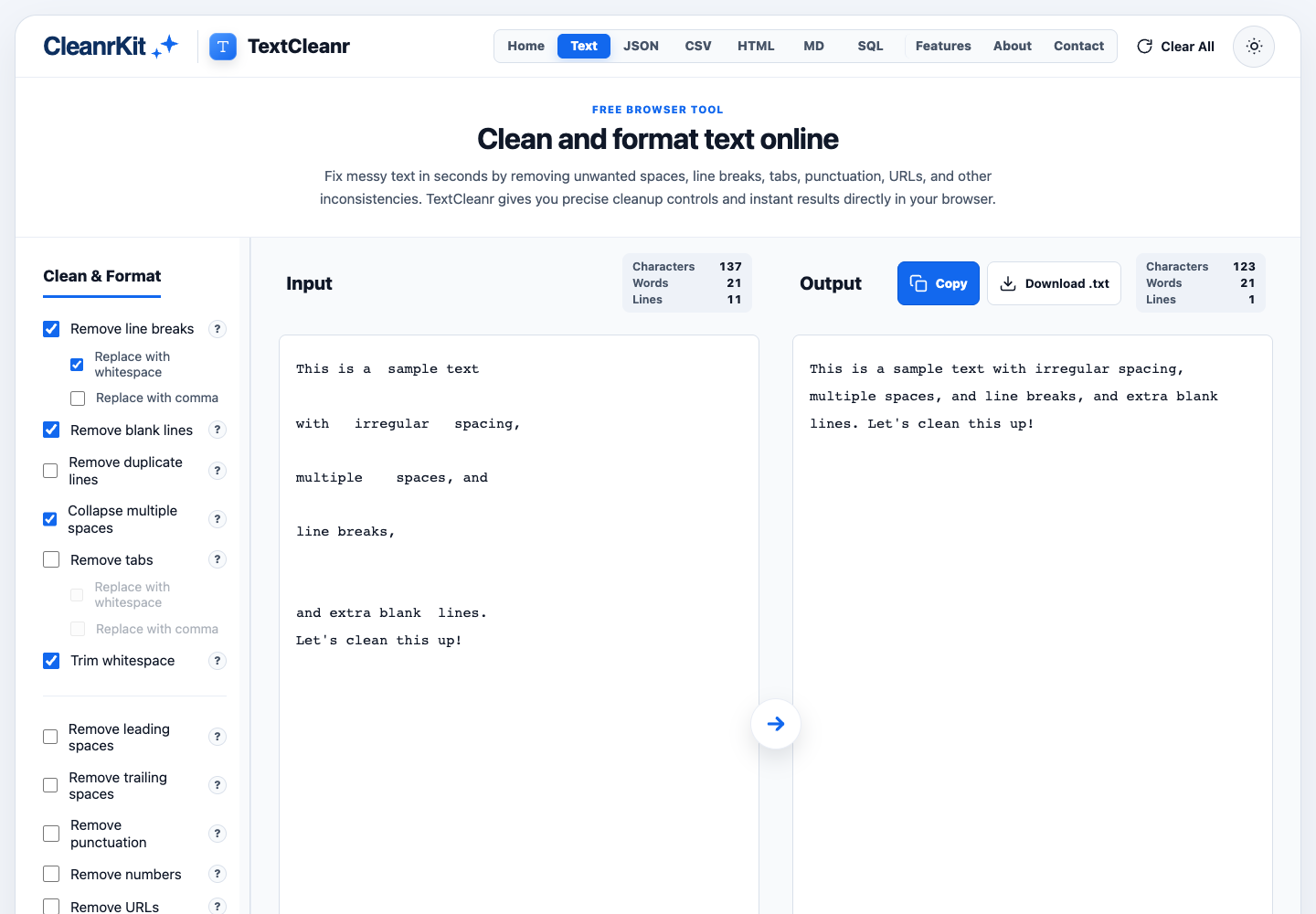
TextCleanr offers named cleanup controls instead of one opaque “fix everything” action. Removing line breaks, collapsing spaces and trimming text are separate operations with different consequences.
Show both sides
Input and output remain visible together, with character, word and line counts. A person can inspect what changed before copying the result into another workflow.
Explain related options
Sub-options belong to a parent action: for example, removing line breaks can use spaces or commas as the replacement. Disabled child controls make that dependency visible.
Keep the exit simple
Copy uses the browser clipboard API, and the text download is created from the current output. The result can leave the tool without creating an account or a saved workspace.
A request-aware editing interface
The current TextCleanr page uses HTML controls, CSS and JavaScript. Its client collects the selected actions and input text, posts JSON to a formatter endpoint, then renders the returned output and statistics. This request path is observable in the public client and was checked with a harmless synthetic example.
The page’s interaction code debounces changes by 250 milliseconds and tracks a monotonically increasing request ID. A response updates the display only if it belongs to the latest request. That prevents an older, slower response from replacing a newer result.
- 01Input & optionsText plus selected actions
- 02Formatter requestJSON sent to the endpoint
- 03Latest responseOutdated results ignored
- 04Inspect & exportOutput, counts, copy or file
Concrete tradeoffs
Live cleanup can create overlapping requests, so responsiveness has to be balanced against redundant work. The debounce reduces unnecessary calls; the response guard protects correctness. The busy state is also held for a minimum interval, trading a small delay for visible processing feedback.
The browser client is verified here; the current server framework and the implementation of the other five formatters are not asserted from the interface alone.
Inspect the result, not just the promise
Observed text transformation
A synthetic input containing repeated spaces and blank lines was submitted through the live interface. Its formatter returned HTTP 200 and the visible output reduced it to a single clean line.
Release evidence
The public changelog identifies the six-tool beta and its delivered interface work. The public roadmap separately labels future workflow improvements and exploratory ideas.
A meaningful reliability boundary
The latest-response guard, explicit request failures and disabled processing control are observable in the published TextCleanr JavaScript. They address ordinary asynchronous UI failure modes rather than a hypothetical scale target.
Make the beta more dependable
The published near-term priorities are reliability across all six cleaners, task-focused workflows, accessibility and mobile behavior. Undo and redo, keyboard shortcuts and reusable presets remain roadmap directions rather than features claimed in this case study.
A useful next release check is to make processing behavior and privacy explanations consistent across the suite, and validate transformations with representative edge cases for each format.